
Finding the best video camera for baseball depends entirely on your setup. Some users need a camera that tracks players automatically for coaching, while others prioritize a long optical zoom to capture distant action from the stands. You must decide if you want a hands-free AI system or a manual camcorder that puts you in total control of the framing. The main divide is between the AI-powered units, like the Veo Cam 3, and the traditional zoom-focused camcorders, such as the Panasonic HC-V770.
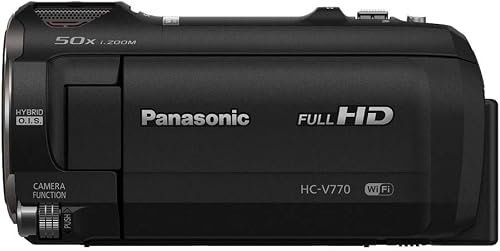
1. Panasonic Full HD Video Camera Camcorder HC-V770

Best for: Someone who prefers manual control over automated AI tracking software.
This camcorder is designed for those who want to operate the camera themselves. With its 20X optical zoom, you can pull in tight shots of specific players from the bleachers. The HDR movie feature helps balance shadows and highlights, which is useful when shooting on bright, sunny baseball fields.
The camera uses a 1/2.3-inch BSI sensor to help reduce noise in lower light. Because it relies on a flexible LCD for framing, you can adjust your angle without needing to look through a fixed viewfinder. This model isn’t for people who want a hands-free experience, as it lacks the built-in AI tracking found in newer sports-specific cameras.
Good if:
- You want high-quality manual optical zoom.
- You prefer using a traditional camcorder form factor.
- You want to use a smartphone as a remote.
Skip it if:
- You want the camera to follow the game automatically.
- You don’t want to hold the camera during the game.
2. XbotGo Falcon All-in-One 4K Action Camera

Best for: A coach or parent who needs a complete AI sports solution.
The XbotGo Falcon is an all-in-one system that removes the need for a dedicated camera operator. Its AI tracking system uses an 8-core processor to keep the action in the frame while you watch the game. It records in 4K, which provides enough detail for later review or scouting purposes.
The dual-lens system separates the recording task from the tracking task, which improves the quality of both. Because it relies on AI, it isn’t ideal for users who want to capture artistic, non-standard shots or who have very specific manual framing requirements. It works best when set up on a tripod with a clear view of the field.
Good if:
- You want hands-free game recording.
- You need 4K resolution for coaching analysis.
- You want to live stream directly from the device.
Skip it if:
- You prefer to frame and zoom your own shots manually.
- You don’t have a stable place to mount a tripod.
3. Veo Cam 3 5G 1080p Sports Camera AI Auto-Tracking Subscription

Best for: Teams that want professional-grade footage for player development and scouting.
The Veo Cam 3 is built for team sports where consistent, high-quality footage is necessary for review. Its AI auto-tracking follows the flow of the game, so you never miss a key play or movement without manual intervention. The device is weather-proof, meaning you can record in rain or snow across a temperature range of 14° F to 113° F.
This camera requires a subscription to access its full suite of features and cloud storage. It isn’t designed for casual users who want a simple, one-time purchase without recurring service requirements. Before buying, verify your location. Subscriptions are strictly limited to the specific list of supported countries, including the United States, Canada, Australia, and most of Europe.
The unit is portable and easy to move between different fields or stadiums. It captures all major team sports, including football, basketball, rugby, lacrosse, and volleyball.
Good if:
- You need reliable, 1080HD footage for professional coaching.
- You record in harsh or unpredictable weather conditions.
- You want a hands-off, automated recording process.
Skip it if:
- You don’t want to pay for a recurring subscription.
- You reside outside the list of supported countries.
- You only need a camera for occasional, casual filming.
4. Logitech for Creators Mevo Start Wireless Live Streaming Camera

Best for: Streamers who want to broadcast games to multiple platforms simultaneously.
The Mevo Start is designed for live streaming. You can connect up to three cameras to create a multi-angle broadcast, which is great for capturing different views of the diamond. It uses an app on your smartphone to control the framing and streaming settings wirelessly.
This camera is built for connectivity, supporting Wi-Fi, Ethernet, and LTE networks. If you’re streaming from a remote location, rely on your smartphone’s LTE connection to keep the broadcast live. It isn’t the best choice if your primary goal is high-zoom action from deep in the outfield, as it lacks the heavy optical magnification found in dedicated camcorders.
If you need to capture broadcast-quality feeds, utilize the NDI-HX or RTMP protocols to integrate the camera into professional setups. The audio is captured via a built-in microphone, though you can plug in external sources for better clarity. Avoid relying solely on the internal mic if you’re in a windy stadium environment; the external input is essential for professional results.
Good if:
- You want to live stream to YouTube or Facebook.
- You have a multi-camera setup in mind.
- You want a compact, wireless streaming solution.
Skip it if:
- You need to zoom in on players from very far away.
- You aren’t comfortable managing a multi-camera app setup.
5. NearStream VM33 Gen 3 Wireless Streaming Camera

Best for: Covering large fields where you need both wide shots and tight zooms.
The NearStream VM33 offers a 40X hybrid zoom, combining 10X optical and 4X digital capabilities to frame subjects up to 100 feet away. It features an 8-microphone array that captures 360-degree sound within 16 feet, using AI noise suppression to clarify speech in noisy environments. You can also add scoreboard overlays through the app to make your videos look more professional.
The camera provides a 6-hour battery life, which covers most standard games. If you’re filming in a studio or venue, use the USB-C port for a webcam mode or connect via Ethernet using a separate adapter. It isn’t for users who want a simple “point and shoot” device, as it includes advanced features like RTMP and NDI streaming that require technical configuration.
Choose Wi-Fi or AP hotspot mode for mobile setups, or switch to RTSP and NDI for production software like OBS. If you need to manage multiple angles, the app allows you to control up to three cameras simultaneously. Rely on the 20GB of cloud storage to ensure your recordings are backed up automatically.
Good if:
- You need a long zoom range for distant subjects.
- You want to add live scoreboards to your video.
- You require professional streaming connections like NDI.
Skip it if:
- You want a basic camera with no app-based configuration.
- You find complex streaming protocols too difficult to manage.
6. XbotGo Chameleon AI Auto Sports Action Camera

Best for: Parents or clubs wanting an automated AI tracking camera.
The XbotGo Chameleon is a mounting system that uses your existing smartphone to track the action. Because it relies on your phone’s sensor, the final video quality depends entirely on your device’s capabilities. It features a 360-degree rotating base and a 15-degree vertical tilt to keep players and the ball in frame automatically.
A key benefit is the lack of a subscription fee. The XbotGo app provides live streaming, highlight editing, and 20GB of cloud storage for free. If you have an eight-hour match day, the internal battery supports the full duration without needing a recharge.
However, this isn’t a standalone camera. You must attach your phone for every session, which ties up your device for the duration of the game. If you need to use your phone for calls or texts during a match, this system will interrupt your workflow.
Good if:
- You want to use your current smartphone for recording.
- You want to avoid monthly subscription fees.
- You need a simple, mountable tracking system.
Skip it if:
- You don’t want to tie up your phone during the game.
- You need a dedicated, all-in-one camera unit that functions independently of your mobile device.
7. RunCam ScopeCam2 4K Zoom Action Camera Waterproof 4xDigital HD Mini

Best for: Capturing specific player movements or training drills from a close distance.
The RunCam ScopeCam2 is a compact, rugged action camera. It’s built to be shock-resistant and IP64 waterproof, making it a reliable choice if you need to mount it on a fence or equipment near the action. It records in 4K and features a physical instant-on switch with vibration feedback for quick operation.
This camera is small and lacks the advanced AI tracking or streaming features found in other models. It isn’t designed for full-field coverage; it’s best used for specific tasks like filming a pitcher’s mechanics or a batter’s swing. If you’re filming a single drill, the 1400mAh battery provides 160 minutes of continuous recording, which covers most practice sessions without needing an external power bank.
Mount the device directly to any standard NATO or Picatinny rail to secure it firmly during high-impact movement. If you’re shooting in dusty or rainy conditions, the aluminum housing ensures the internal hardware remains protected.
Good if:
- You need a durable, weather-proof camera.
- You want to record close-up training drills.
- You need something small and easy to mount.
Skip it if:
- You need to film the entire field.
- You want automatic player tracking.
Where These Overlap
The field of sports cameras is split between two distinct philosophies: the manual camcorder and the automated AI tracker. Products like the Panasonic HC-V770 and the NearStream VM33 occupy the manual space, giving you total control over the zoom and the framing. These are best if you are an experienced operator who knows how to manage the shot and when to zoom.
Conversely, the XbotGo Falcon, XbotGo Chameleon, and Veo Cam 3 represent the automated future. They take the labor out of filming, allowing you to watch the game while the software does the work. If you choose an AI unit, ensure you’re comfortable with the app interface, as that will be your primary way of managing the device.
The Logitech Mevo Start sits in the middle, offering a hybrid approach for those who want to live stream but still want to control the angles manually. When deciding, consider your environment. If you need to record in rain or snow, the Veo Cam 3 is weather-proof. If you require long-distance framing, the 40X hybrid zoom of the NearStream VM33 is the tool. Misjudging your need for manual oversight versus automated convenience often results in unusable footage or missed highlights.
Still Not Sure?
How often will I really use this?
If you’re filming every single game for a season, an automated system like the Veo Cam 3 is a wise investment because it saves you from standing behind a camera for hours. For occasional use, a simpler device like the XbotGo Chameleon is better, as it uses your own phone and doesn’t require a permanent setup.
What do I already own that this must work with?
Think about your current phone and computer. If you have a powerful smartphone, the XbotGo Chameleon is a natural fit. If you’re building a professional streaming station, the Logitech Mevo Start or the NearStream VM33 will integrate better with your existing software and network hardware, as established by the NearStream official support documentation.
What am I most likely to regret choosing?
Most users regret choosing a camera that’s too complicated for their technical skills. If you aren’t tech-savvy, avoid cameras that require complex NDI or RTMP configurations. Start with something simple like the Panasonic HC-V770 if you want to learn the basics of manual filming, or an automated system like the XbotGo Falcon if you just want the job done.
Related guides
Frequently Asked Questions
Can I use these cameras for both baseball and softball?
Yes, all of these cameras are capable of filming both baseball and softball. The primary difference is the field size and the speed of the ball, which may require different zoom settings. AI-based cameras like the Veo Cam 3 are specifically programmed to recognize the movement patterns of team sports, making them effective for both diamond games without needing manual adjustment between innings.
Do I need a special mount for a fence?
Most of these cameras come with a standard 1/4-inch tripod mount, which is compatible with many third-party fence mounts. However, the RunCam ScopeCam2 is specifically designed to be robust and easy to attach to various structures. Always check if your chosen camera includes a mounting bracket or if you need to purchase a universal fence mount separately to get the right angle.
How much storage do I need for a full game?
The amount of storage depends on the resolution and frame rate you choose. Recording in 4K, as offered by the XbotGo Falcon and RunCam ScopeCam2, will fill a memory card much faster than 1080p footage. If you plan to record long games, look for models that support cloud storage or have high-capacity microSD card compatibility to avoid running out of space mid-inning.
Can these cameras stream directly to social media?
Many of these models, including the Logitech Mevo Start and NearStream VM33, are built with live streaming in mind. They allow you to stream directly to platforms like YouTube and Facebook via the companion app. If live streaming is your priority, verify that the camera supports the specific streaming protocols or platforms you intend to use before making your final selection.


