
Selecting a video camera that records 1080p at 120fps depends on whether you need a portable vlogging device or a stationary industrial tool. These products are split between handheld cameras for travel and USB-based modules built for precision tasks like sports analysis or machine vision.
Best overall: DJI Osmo Pocket 3 offers a 1-inch sensor and 3-axis mechanical stabilization, making it the most versatile choice for high-quality, smooth vlogging on the go. Best for action: DJI Osmo Action 5 Pro features an IP68 waterproof rating and a durable design, built specifically to handle rough environments and underwater recording at high speeds. Best for precision: ELP Global Shutter Camera uses a global shutter sensor to eliminate rolling artifacts, providing the most accurate, distortion-free capture for fast-moving industrial or technical subjects.
The rest of this guide is for users who need to capture 120fps video for creative projects, sports training, or technical inspection.
How We Picked
We compared 16 different camera listings to identify models that reliably support 1080p at 120fps. Each selected product had to clearly state its frame rate and resolution capabilities, as well as its intended use case. We excluded any cameras that lacked clear technical specifications regarding their sensor type or connectivity, ensuring that only those with proven UVC or dedicated recording performance were included.
1. DJI Osmo Pocket 3 Vlogging Camera with 1” CMOS &

Best for: Vloggers needing portable, professional-grade stabilized video.
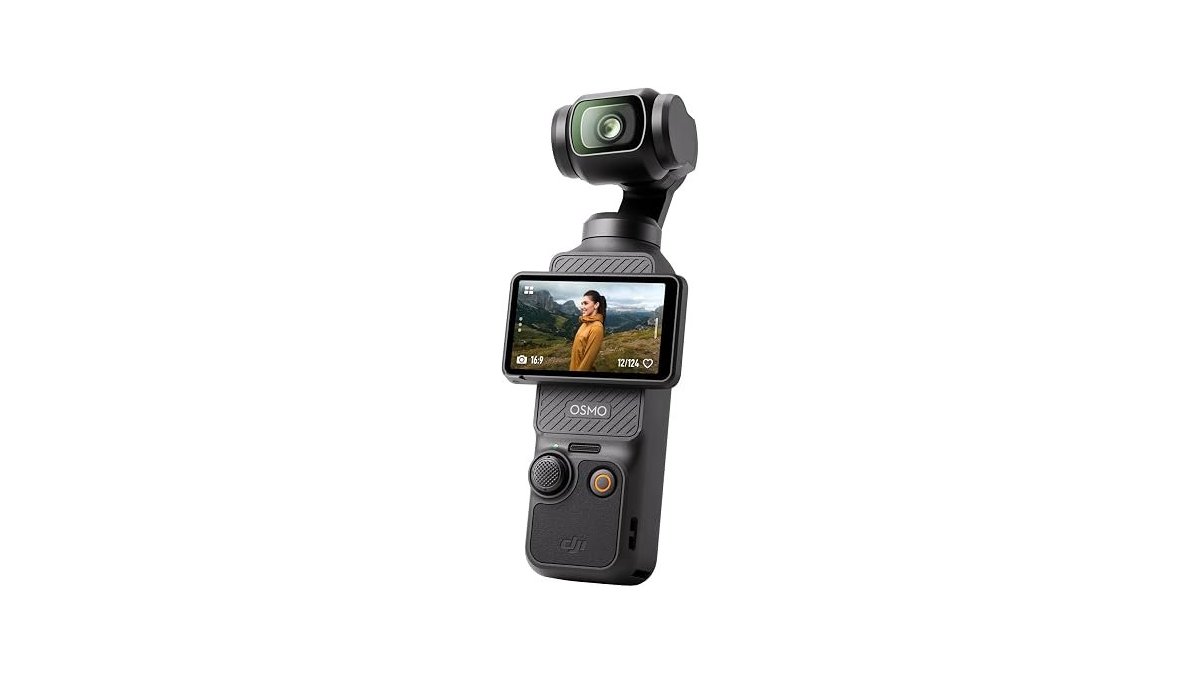
The DJI Osmo Pocket 3 stands out with its 1-inch CMOS sensor, which helps capture clear footage even in challenging lighting conditions like sunsets. The 3-axis mechanical stabilization is built into the device, removing the need for external gimbals when you’re hiking or chasing pets. Its 2-inch rotating touch screen makes it simple to switch between vertical and horizontal framing instantly.
ActiveTrack 6.0 keeps you centered in the frame automatically, which is helpful if you’re filming yourself while moving. If you need to record fast-paced action, use the 4K resolution at 120fps to ensure smooth playback. When shooting high-contrast scenes, apply D-Log M and 10-bit color depth to record up to one billion colors. This provides the flexibility required for professional post-production grading.
Avoid using this camera for industrial automation or fixed-mount machine vision. It’s a handheld tool built for mobility, not a stationary sensor for continuous monitoring. If you prioritize portability for travel or family gatherings, the compact design ensures you never miss a moment. However, if your workflow requires immediate, ready-to-publish footage without editing, stick to standard color profiles rather than the advanced D-Log M settings.
Pros
- Large 1-inch CMOS sensor
- Built-in 3-axis mechanical stabilization
- Rotating 2-inch touch screen
- 4K/120fps recording capability
Cons
- Not designed for stationary industrial mounting
- Advanced color grading requires post-production software
2. DJI Osmo Action 5 Pro Essential Combo

Best for: Athletes and adventurers recording in rugged conditions.
The DJI Osmo Action 5 Pro utilizes an all-new 1/1.3″ sensor with 2.4 µm pixels and a 4nm chip to maintain focus on fast-moving subjects. Its IP68 rating allows for 20-meter submersion without a case, making it essential for deep-water activities. If your footage involves rapid rotation, the 360° HorizonSteady feature preserves a level horizon.
Use the 16:9 or 9:16 framing modes to keep subjects centered during cycling or vlogging. While most cameras struggle in the cold, this unit provides 3.6 hours of recording even at -20° C. If you’re filming in extreme temperatures, rely on the internal battery rather than external packs to maintain this performance.
The dual OLED touchscreens allow for quick parameter adjustments without removing the camera from its mount. For high-quality audio, connect directly to a DJI Mic 2 transmitter without needing a separate receiver.
Pros
- Waterproof up to 20 meters
- Long 4-hour battery life
- HorizonSteady stabilization technology
- Direct wireless audio connectivity
Cons
- Lacks manual optical zoom
- Fixed wide-angle lens only
If you require precise color accuracy, the built-in color temperature sensor handles white balance automatically. This eliminates the need for filters, even when transitioning between underwater and land environments. If you’re recording solo, use the voice control feature within one meter for hands-free operation.
3. SVPRO USB Camera 1080P 120fps High Speed Camera

Best for: Sports analysts looking for detailed, zoomable video.
The SVPRO 1080P High Speed uses a 1/2.3-inch 12MP sensor to provide high-resolution images alongside its 120fps video capability. The 3.6-10mm manual zoom lens gives you 3X optical zoom, allowing you to adjust the focus and depth for different distances. It connects via USB and works with most standard webcam software, making it easy to set up for golf simulators or technical documentation.
Because it’s a UVC-compliant device, you don’t need to install extra drivers on Windows, Linux, or macOS. If you need to capture fast-moving subjects, verify that your specific video software supports the camera’s ultra-smooth high-speed output. Some programs, such as QuickTime, impose frame rate limitations that prevent you from reaching the camera’s maximum speed. Always check your software settings before starting a session to ensure the frame rate is manually set to the highest available option.
This camera isn’t meant for handheld vlogging, as it lacks a screen, internal battery, and stabilization. It’s a stationary tool designed for machine vision, 3D scanning, and industrial inspections where fixed framing is required.
Pros
- Adjustable 3X optical zoom
- Broad UVC compatibility
- High-resolution 12MP sensor
Cons
- Requires external software for 120fps
- No internal stabilization or battery
4. ELP High Speed Global Shutter USB3.0 Camera

Best for: Technical users needing to stop fast motion without distortion.
The ELP Global Shutter Camera uses an Aptina AR0234 sensor to capture frames all at once. This prevents the “jello” effect or rolling artifacts common in fast-moving scenes. While standard cameras scan line-by-line, this global shutter sensor exposes every pixel simultaneously. Use this if your project involves tracking high-speed objects or precision machine vision.
The 120-degree wide-angle lens fits into narrow spaces, making it ideal for industrial integration. The USB 3.0 connection ensures high-speed data transfer. You can reach 200fps at 720p or 120fps at 1080p resolution. If you need maximum frame rates, prioritize the MJPEG format over YUY2 to keep your system responsive.
The camera is small and lightweight for installation on a robotic arm or inside a custom enclosure. It’s plug-and-play with UVC support for Windows, Linux, Mac, and Raspberry Pi. You don’t need to install extra drivers.
This device isn’t for creative vlogging. It lacks a microphone, a screen, and onboard image processing for aesthetic color grading. Stick to industrial or technical applications where speed and accuracy are the only metrics that matter.
Pros
- Global shutter prevents rolling artifacts
- Compact size for tight spaces
- Fast USB 3.0 connectivity
Cons
- No onboard audio recording
- Lacks aesthetic vlogging features
5. ELP 12mp USB Camera Manual Zoom Webcam

Best for: Users who need a versatile, manually adjusted zoom lens.
The ELP 12MP USB Camera features a 3.6-10mm varifocal lens, allowing you to manually control the zoom, focus, and aperture for precise framing. It’s useful for macro photography because it can focus on objects as close as 5cm away. The 1/2.3-inch IMX577 sensor is designed for low power consumption while maintaining high-quality output at 1080p.
If you’re capturing quick-moving objects, utilize the highest available frame rate setting to ensure clarity. When working in low-light environments, the sensor performs down to 0.1Lux. Choose between MJPEG or YUY2 compression formats depending on whether you prioritize bandwidth or raw image fidelity.
It connects easily through a high-speed USB 2.0 interface and works immediately with common systems like Jetson Nano, Raspberry Pi, and Windows. This camera is a good fit for live streaming or video conferencing where you need to adjust the view manually.
Avoid this unit if you require an automatic, “point-and-shoot” experience. Because the aperture, focus, and zoom are entirely manual, you must physically rotate the lens rings to achieve the sharpest image.
Pros
- Manual control over zoom and aperture
- Good macro focus performance
- Low power consumption sensor
- High frame rate for motion
Cons
- Manual lens adjustments take time
- No autofocus capability
6. USB Camera 4K 12 Megapixels USB Webcam 1080P 120fps High

Best for: Professional documentation and golf swing analysis.
The USB 4K High Speed camera provides a maximum resolution of 3840×3040, making it useful for capturing still images as well as high-frame-rate video. Its 3.6-10mm manual optical zoom lens allows you to get close to the action, which is helpful for golf simulators or industrial inspections. The camera is UVC-compliant, so it connects directly to computers, Android devices, or Raspberry Pi units without needing extra drivers.
It works well for applications where you need to see fine details, like in medical equipment, 3D scanners, or electron microscopes. You must use professional video software to reach the maximum high-speed performance at 1080p, as basic programs like Quicktime often impose frame rate limitations. This camera isn’t designed for mobility and doesn’t include a stand, so you’ll need to mount it yourself.
Pros
- High 4K still image resolution
- Flexible 3X optical zoom
- Plug-and-play USB setup
Cons
- Requires professional software for 120fps
- No included mounting stand
- High resolution settings significantly reduce frame rates
7. ELP High Speed USB Zoom Camera

Best for: Long-distance shooting and high-speed data transmission.
The ELP USB3.0 Zoom Camera features a 5-50mm manual zoom lens, offering a 10X zoom range for capturing objects at various distances. You adjust the zoom, brightness, and clarity by manually rotating the lens. Because this is a manual focus unit, it isn’t for users who need instant autofocus for moving subjects.
It uses the IMX577 sensor to maintain performance in both indoor and outdoor environments, even in low light down to 0.1 lux. With USB 3.0, it can handle high frame rates up to 1080p at 230fps, which is well above the standard requirement for fluid motion capture.
The camera is housed in a small, lightweight frame that’s easy to integrate into embedded systems or industrial projects. It supports both MJPEG and YUY2 formats, giving you options for how you handle your video data. Because the device is UVC-compliant, it works as a plug-and-play unit on Windows, Mac, Linux, and Android without needing extra drivers.
If you’re building a machine vision system, prioritize the USB 3.0 connection to ensure you hit those high frame rates. If you use a USB 2.0 port, expect the data throughput to drop significantly.
Pros
- Wide 10X optical zoom range
- Extremely high frame rate support
- Compatible with industrial SBCs
Cons
- Requires manual calibration
- Not intended for casual use
How to Choose in Sixty Seconds
Which type of camera do I actually need?
Choose a dedicated vlogging camera if you need portability, internal batteries, and built-in stabilization for handheld use. These cameras handle the heavy lifting of image processing and stabilization internally, making them ideal for travel or vlogs.
If you’re building a system for sports analysis, golf simulation, or machine vision, choose a USB-based module. These modules require a fixed mount and a computer connection. They offer manual lens control and global shutter sensors that handheld cameras can’t match. You should choose a global shutter model if your primary goal is to capture high-speed motion without the rolling artifacts that plague standard sensors.
Does the frame rate matter more than the resolution?
If you’re analyzing fast motion, like a golf swing or a mechanical part, 1080p at high frame rates is often more useful than 4K at 30fps. High frame rates reduce motion blur, allowing you to see the details of the movement clearly.
If you’re filming scenic landscapes or vlogs, higher resolution is usually more important. Always verify that your recording software can handle the high data throughput of 120fps before you commit to a high-speed camera. Many basic programs, such as QuickTime, have frame rate limitations that will drop frames or cap your output. If your software doesn’t allow you to set a higher frame rate, the hardware capability is wasted.
What should I check before I buy?
Confirm that the camera supports the UVC protocol if you want a simple plug-and-play experience on a computer or Raspberry Pi. Check the lens type: manual zoom lenses give you flexibility for different distances, but they require you to physically turn the lens to focus.
If you need to capture objects moving quickly, prioritize a global shutter camera to avoid distortion. Next, match your lens to the distance: a 5-50mm lens offers 10X zoom for long-range monitoring, while a 3.6-10mm lens suits close-up scenarios. Finally, ensure your USB interface supports your resolution and frame rate to prevent bottlenecks. Research specific camera models to begin your integration.
Related guides


