
Choosing the right video camera for a 10-year-old involves balancing ease of use with the desire for professional-style features. Some models focus on rugged durability for outdoor play, while others offer advanced settings like night vision and 4K recording to help a young creator learn the ropes of filmmaking.
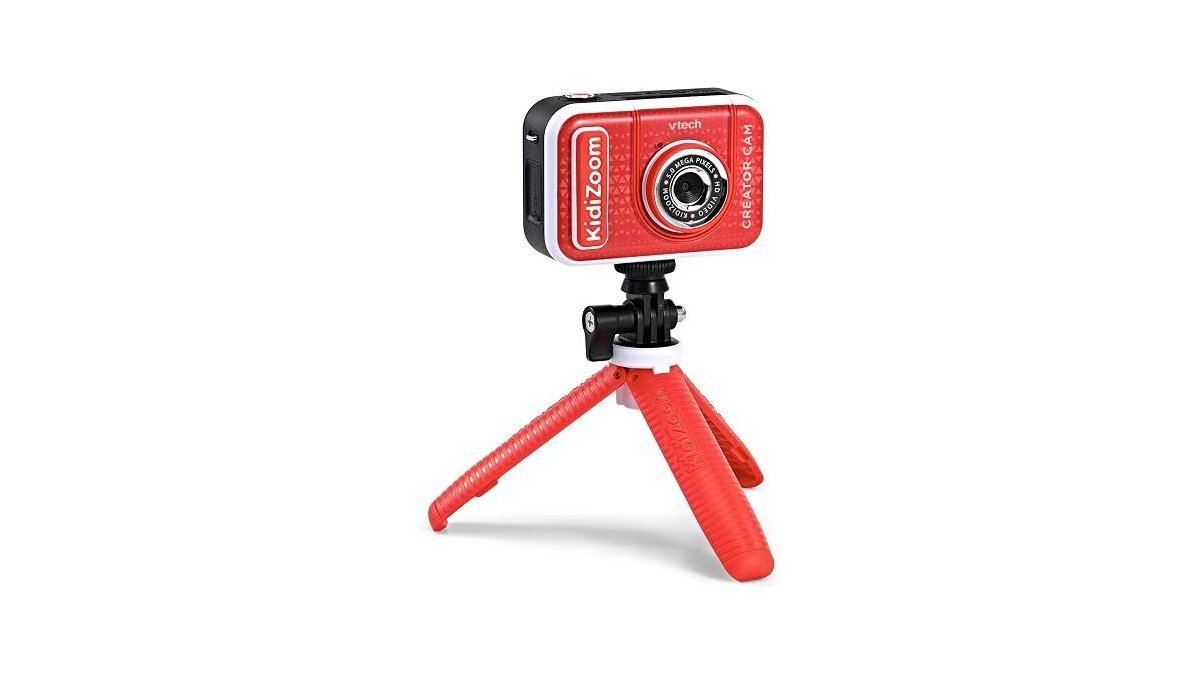
Best overall: Kimire Full HD Camcorder offers a reliable balance of resolution and simple controls, including a pause function that makes editing clips much easier for beginners. Best for creative projects: VTech KidiZoom Creator Cam provides an all-in-one kit with a green screen and special effects, specifically designed to help younger kids start making their own videos. Best for outdoor action: Vivitar Kids Action Camera is built to handle water, dust, and drops, making it the right choice for kids who want to record while biking or swimming.
This guide is for parents looking to encourage a child’s interest in media creation by selecting a device that matches their current skill level.
How We Picked
We compared 16 different Amazon listings to identify which cameras provide the most value for a 10-year-old. Every product included in this review had to clearly state its technical specifications, such as video resolution, battery life, and included accessories. We prioritized devices that offer features like pause buttons or simple USB connectivity, as these tools help children learn the basics of digital media without unnecessary complexity. Any product that lacked clear information regarding its primary functions or included components was excluded to ensure you have the necessary details to make an informed decision.
1. VTech KidiZoom Creator Cam

Best for: Young creators interested in special effects.
This camera is designed specifically for children, featuring a built-in microphone and creative tools like time-lapse video. It comes with a green screen, allowing kids to swap backgrounds and appear as if they’re in space or being chased by a dinosaur. The included tabletop tripod and selfie stick help children stabilize their shots while they learn to frame their subjects.
If your child is under age 5, this device may prove too complex to operate effectively. Stick to the 5–10 age range to ensure the interface remains intuitive and engaging.
Because it’s built for younger users, video can only be uploaded to a computer via the provided USB cable at an adult’s discretion. This provides a necessary layer of safety for parents managing digital content. Always keep the 3.7-volt rechargeable lithium-ion battery charged using the included cable to avoid mid-session power failures.
- Pros:
- Includes green screen for effects
- Designed specifically for younger kids
- Includes tripod and selfie stick
- Cons:
- Limited to ages 5-10
- Requires adult help for uploads
2. kimire Video Camera Camcorder Digital Camera Recorder Full HD 1080P

Best for: Beginners learning basic video production.
This camcorder features a 3-inch LCD screen that rotates 270 degrees, which is helpful for framing solo shots or vlogs. It supports a pause function, allowing the user to stop recording and resume without starting a new file, which simplifies the editing process later. It also functions as a webcam when connected to a computer. To use this, you must download the AMCAP software and select the “PC CAM” mode on the camera.
The camera supports recording while charging, which is helpful for long sessions. If you’re filming for extended periods, keep the camera plugged in to bypass the 60 to 90-minute limit of the two included batteries. Always format your SD card before the first use, or the device may fail to save your files. You must buy an SD card separately, as the package doesn’t include one. The listing doesn’t mention the camera’s durability or protective casing.
- Pros:
- Useful built-in pause function
- Rotatable screen for vlogging
- Can act as a webcam
- Cons:
- SD card not included
- No protective waterproof casing
3. ZYDIIE 4K Video Camera Camcorder UHD 64MP Vlogging Camera

Best for: Kids interested in high-resolution recording.
This camera offers 4K recording and 64MP photo resolution, providing significant detail for young vloggers. The 3-inch touchscreen rotates 270 degrees, making it easier to frame solo shots or creative angles. The device includes a wireless remote, which allows the creator to start and stop recording without touching the camera body. It also features an infrared night vision mode, which you should activate using the “OK” button to capture high-contrast footage in total darkness.
The inclusion of two batteries and a 32GB memory card means the user can start recording immediately. When you need to stream, connect the camera via USB to use it as a webcam without installing extra drivers. However, the advanced 4K settings might be more than a casual user needs. If you find the menu system too technical, stick to the basic modes to avoid frustration. The menu is designed for a more deliberate workflow than simpler toys, so expect a learning curve.
- Pros:
- High 4K video resolution
- Includes wireless remote control
- Night vision mode included
- Cons:
- Advanced settings require learning
- Higher complexity for beginners
4. Vivitar Kids Action Camera

Best for: Active kids who record outdoors.
This camera is built to withstand rough conditions, coming with a waterproof case that protects against water, dust, and drops. It features a 2-inch screen and large, simple buttons that are easy for children to operate. The kit includes bike and helmet mounts, so the child can start recording their adventures right away.
The battery supports over 100 minutes of recording on a single charge. If you’re heading out for a full day of swimming or snowboarding, keep the USB cable nearby to recharge quickly between sessions. Use the included bandages and neck strap if you need to secure the camera in positions where the standard mounts don’t fit.
If the subject is stationary or in low light, expect lower image quality than a standard smartphone.
- Pros:
- Includes waterproof, dustproof case
- Comes with bike/helmet mounts
- Large, simple control buttons
- Cons:
- Limited to action-style footage
- Lower resolution than others
5. TOKKY Digital Camera

Best for: Older kids moving toward serious vlogging.
This camera features a 3-inch screen that flips 180 degrees, making it well-suited for vloggers who want to see themselves while recording. It captures 4K video and 56MP photos, and includes features like anti-shake and burst mode to help improve image quality. The camera is lightweight at 0.45lbs and uses a modern Type-C charging port.
If your child is active, use the 16X digital zoom to capture distant subjects or the 3/5/10-second timer to include the whole family in shots. The included 32GB memory card stores over 3000 photos, so they can keep shooting without stopping to delete files.
It’s intended for older children who are ready to move away from toy-like devices. If the subject is moving quickly, switch to burst mode to ensure the action is captured clearly.
- Pros:
- Flip screen for vlogging
- Lightweight and portable design
- Includes 32GB memory card
- Cons:
- Not for very young children
- Requires careful handling
6. Full HD Kids Camcorder

Best for: Those wanting a straightforward, simple experience.
This camcorder focuses on ease of use, with a simple setup process involving the insertion of an SD card and battery. You must format your memory card before your first recording to ensure the device functions correctly. It features a 3-inch rotating screen and a hot shoe interface, which allows the user to attach external lighting if needed. It also includes infrared night vision for recording in dark settings up to 16 feet away.
The device is lightweight, making it easy to carry for travel or family events. If you need to stream or chat, connect the camera to your computer via USB and select the “PC CAM” mode.
- Pros:
- Simple to set up
- Includes night vision mode
- Hot shoe for accessories
- Cons:
- SD card not included
- Basic feature set
7. 2.7K 64MP Video Camera Camcorder IR Night Vision YouTube Vlogging

Best for: Close-up and detailed vlogging.
This camcorder features an auto-focus system that works as close as 3.93 inches, which is excellent for capturing details on small objects or portraits. It performs best for close-up photos within 6.56 feet. It offers 2.7K video resolution and built-in filters to add creative effects to footage. The included 1500mAh battery supports up to 90 minutes of continuous recording, though you can extend this by recording while charging.
It comes with a 16GB SD card, so it’s ready to use out of the box. If you need more space, the device supports expandable storage up to 128GB. This camera isn’t for users who prioritize extreme long-distance zoom, as the zoom capabilities are limited to 4X for video. Use this for daily vlogging and indoor events, but reach for a different device if your primary goal is capturing distant wildlife or sports from the back of a stadium.
- Pros:
- Fast auto-focus for close-ups
- Includes 16GB memory card
- Multiple creative filter options
- Cons:
- Limited 4X video zoom
- Not for long-distance shots
How to Choose the Best Video Camera for a 10 Year Old
Which difference between these cameras actually matters most?
The intended use is the most important factor. If your child wants to record sports or biking, look for a camera like the Vivitar Kids Action Camera that includes protective gear and mounts. If they want to sit in their room and record vlogs, look for a camera with a flip-out screen and a tripod mount like the TOKKY Digital Camera. Features like 4K resolution are nice, but for a child in the middle of elementary school, the ability to record comfortably and keep the camera stable is more important than raw pixel count.
What should I skip if I am on a budget?
Skip models that try to do everything at once if you’re worried about complexity. Many cameras include complex settings like Infrared Night Vision or professional-style hot shoes that a young beginner may never use. Focus on the basics: is the menu easy to read? Does it have a tripod mount? Does it come with an SD card or a storage solution? You can always upgrade to a more technical camera later if your child sticks with the hobby long-term.
What should I confirm before ordering?
Always check if the camera includes an SD memory card. Many manufacturers, such as those for the Kimire Full HD Camcorder and the Full HD Kids Camcorder, provide the camera but leave the storage card out of the box. You should also verify if the battery is removable or built-in, as this affects how you charge the device during long trips.
Related guides
Frequently Asked Questions
What kind of storage do these cameras need to work?
Most of these cameras use standard SD or Micro SD cards to save photos and videos. You must ensure the card’s capacity is within the limit supported by the specific model, which is often up to 128GB. Always format the card within the camera’s settings menu before your first use.
What does owning one of these cameras ask of the buyer afterwards?
You must regularly maintain your camera’s battery and storage to ensure optimal performance. Charge batteries according to the manufacturer’s instructions, such as the initial 8-hour charge required for the Kimire Full HD Camcorder. Regularly transfer files to a computer to clear space on the memory card.
What typically goes wrong first on these devices?
Most common issues relate to the memory card or battery life. If the camera stops recording, the SD card is likely full or needs formatting; if it won’t turn on, the battery needs a recharge. Handle rotating screens on models like the ZYDIIE 4K Vlogging Camera with care to avoid hinge damage.
Is the simplest one on the list enough for a 10-year-old?
Yes, a simple camera is often better for a beginner. Models like the Full HD Kids Camcorder are designed to be intuitive, allowing a child to focus on content creation rather than complex menus. These cameras provide enough quality to learn the basics of framing and lighting before transitioning to advanced models.


