
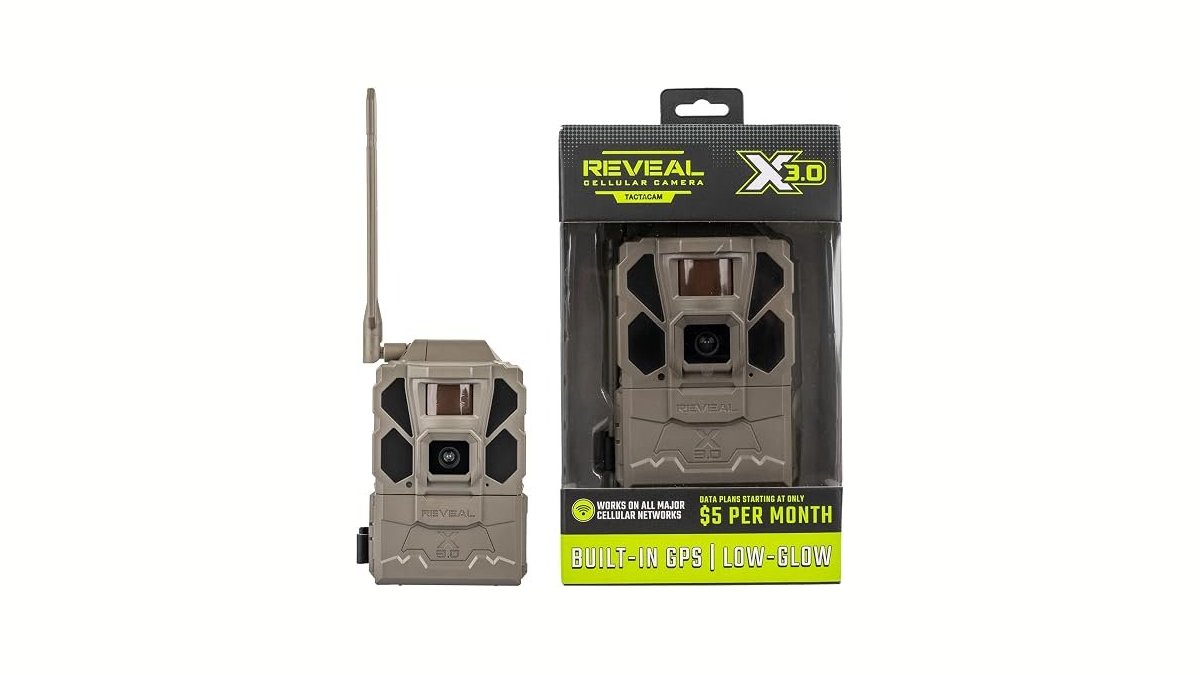
Selecting the best trail cameras for security depends on your local signal strength and whether you want remote alerts or manual data retrieval. Cellular units like the Tactacam Reveal X 3.0 send instant notifications, while non-cellular models like the GardePro E5S require physical SD card checks.
1. Tactacam REVEAL X 3.0 Cellular Trail Camera

Best for: Someone who wants a set-it-and-forget-it cellular monitoring solution.
Its integrated SIM technology automatically connects to the available signal between AT&T and Verizon, which helps avoid dead zones.
This camera is built for long-term deployment, as the listing highlights its compatibility with various power accessories like solar panels or battery belts to extend its runtime. However, this model isn’t for someone who requires manual pan-and-tilt control, as it uses a fixed lens. If you need to cover a wide area from a single mounting point, you might find its fixed field of view limiting.
Good if:
- You want automatic carrier switching.
- You need fast trigger speeds.
- You prefer integrated app-based setup.
Skip it if:
- You need to rotate the camera remotely.
- You’re strictly against using cellular apps.
2. REOLINK 4K Solar Security Cameras Wireless Outdoor
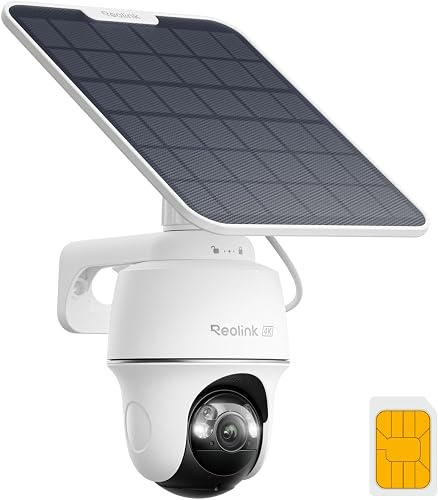
Best for: Someone needing precise control over a remote area.
The Reolink 4K Solar stands out because it offers 355-degree horizontal and 140-degree vertical movement. This precision control allows you to monitor specific zones without needing multiple cameras. The 4K imaging provides high detail, and the AI analysis helps distinguish between people, vehicles, and animals, which reduces the number of false alerts sent to your phone.
Because it relies on solar power and 4G LTE, this camera is ideal for locations that lack traditional power or internet infrastructure. It’s not, however, the right choice for someone who wants a simple, compact device for quick wildlife scouting. The motorized base and solar setup require a more substantial installation compared to fixed-lens alternatives.
Good if:
- You need remote pan-and-tilt control.
- You want AI-based detection alerts.
- You have 4G cellular coverage.
Skip it if:
- You want a small, low-profile camera.
- You have no interest in using an app for alerts.
3. TACTACAM Defend 360 Cellular Security Camera

Best for: Someone who needs a single camera to cover a large, open area.
The Defend 360 is built to provide a full 360-degree view, which removes the need to install multiple fixed cameras to monitor a property. By allowing you to pan, tilt, and zoom directly from your phone, it provides significant flexibility for checking different angles on demand. It connects over LTE and includes solar charging to keep the battery running off-grid.
This model is designed for those who need active, remote surveillance capabilities. It may not be the best pick for a user who wants a simple, passive camera that records only when triggered by motion. If your primary goal is to minimize device footprint, the mechanical nature of this camera makes it larger than standard trail cameras.
Good if:
- You need a full 360-degree view.
- You want remote camera movement.
- You need off-grid solar power.
Skip it if:
- You only need a simple, fixed-angle view.
- You prefer a smaller, non-mechanical camera.
4. Spypoint Flex-M Twin

Best for: Someone who wants multiple units with simple network connectivity.
The Flex-M Twin provides a dual-SIM setup that connects to all major carriers to ensure you maintain a signal. It’s built to be easy to manage, with over-the-air updates that allow you to change settings without visiting the site. The ability to request full-HD files from the camera remotely is a useful feature for getting better detail when you spot something interesting.
This product isn’t for the buyer who wants a device with built-in solar panels, as the battery pack needed for extended field life is sold separately. If you need a camera that’s ready to run for a year without intervention, you’ll need to plan for that additional purchase.
Good if:
- You want dual-SIM network reliability.
- You need remote over-the-air updates.
- You prefer a simple, user-friendly app.
Skip it if:
- You need an integrated solar panel.
- You require a camera that operates without any cellular plan.
5. Moultrie Edge 3 Cellular Trail Camera

Best for: Someone who wants an all-in-one solar solution for deer monitoring.
The Moultrie Edge Solar features an integrated solar panel and AI animal detection, making it a specialized tool for wildlife monitoring. It connects to four major networks automatically, which helps ensure it stays online in remote areas. The “Live Aim” feature allows you to preview your camera view in real time via the app to ensure your placement is accurate before you leave the site.
Use this camera when you need to track specific movement patterns rather than general activity. Because it uses AI to filter for specific game, it saves you from sorting through thousands of empty frames or false alerts. If you’re hunting a property with spotty service, rely on the auto-connect feature to find a signal among four carriers without needing a SIM card.
This camera is highly tailored toward scouting, so it might not be the best fit for a general home security user. If your primary interest is broad-spectrum security rather than specific animal movement patterns, the specialized hunting features may not align with your needs. Avoid this model if you require constant, non-cellular local storage, as its primary strength lies in remote, app-based management.
Good if:
- You want an integrated solar panel.
- You need real-time view previews.
Skip it if:
- You want a camera for general home use.
- You prefer a non-cellular security system.
6. GardePro E5S Non-Cellular Trail Camera

Best for: Someone who wants high-resolution images without a monthly subscription.
The GardePro E5S is a high-performance, non-cellular camera that focuses on image quality. With 64MP photo capability and 1296P video, it provides sharp results for those who don’t need real-time alerts. Because it doesn’t use cellular or Wi-Fi, it uses very little power, leading to fewer battery changes than cellular models.
This camera is strictly for those who are willing to retrieve the SD card manually. It isn’t for a user who needs to know what is happening on their property the moment it happens. The listing doesn’t mention remote access for the GardePro E5S.
If you plan to leave the device in a remote area for months, pair it with the GardePro SP350 solar panel to ensure continuous operation. Without this addition, you must rely on eight AA batteries.
The camera features a 0.1s trigger speed driven by three PIR sensors. This setup is ideal for capturing fast-moving wildlife.
Good if:
- You want high-resolution 64MP photos.
- You prefer long battery life.
Skip it if:
- You need instant alerts on your phone.
- You can’t visit the site to check footage.
7. WOSPORTS Trail Camera(Non-Cellular Non-WiFi) 64MP 4K 0.2S Trigger Motion Activated

Best for: A first-time buyer looking for a simple, non-cellular setup.
The WOSPORTS Trail Camera is a straightforward, non-cellular option that offers a 0.2-second trigger speed. It uses no-glow night vision, which is designed to be less visible to wildlife. With a built-in 2-inch LCD screen, you can check your photos and videos directly on the device. This eliminates the need to remove the SD card just to preview your captures.
While it’s versatile enough for backyard security, it doesn’t offer the remote monitoring features of cellular models. If your property is too far away to visit every few days, this camera won’t provide the updates you need. It’s a local-storage device only. You must physically retrieve the SD card to transfer files to a computer.
If you choose this model, utilize the 1–3 burst shooting mode to ensure you don’t miss fast-moving subjects. Because it lacks remote connectivity, rely on the password protection feature to keep your data secure if the unit is placed in a public or semi-public area.
Good if:
- You want to view footage on an LCD screen.
- You prefer a non-cellular, no-subscription camera.
- You need invisible night vision.
Skip it if:
- You need remote, real-time activity alerts.
- You can’t physically access the camera location.
Where These Overlap
The primary divide in this category is between cellular-connected cameras and those relying on local storage. Models like the Tactacam Reveal X 3.0 and the Spypoint Flex-M Twin provide remote, real-time alerts. The choice between them often comes down to the specific app interface and how each handles cross-carrier signal switching.
If you require property monitoring without a cellular plan, the GardePro E5S and WOSPORTS models function as high-resolution, non-cellular tools. You must be comfortable with manual data retrieval to use these. If you choose this route, the decision rests on whether you prioritize the 64MP image resolution of the GardePro or the convenience of the built-in LCD screen found on the WOSPORTS model.
A common mistake is assuming all cellular cameras require a specific carrier. Most modern units, such as the Moultrie Edge 3 or Tactacam Reveal, use auto-connect technology to lock onto the signal available. If you’re in a remote area with poor coverage, prioritize cameras with dual-SIM or multi-carrier capabilities to avoid dead zones. If you only need to monitor a backyard or accessible gate, local storage models save on monthly subscription fees.
Still Not Sure?
How often will I really check my footage?
If you’re planning to monitor a site you visit daily, a non-cellular camera like the GardePro E5S is excellent because it avoids subscription fees. However, if the site is remote and you only visit once a month, you’ll miss activity unless you choose a cellular camera like the Tactacam Reveal X 3.0. A cellular camera ensures you stay informed regardless of your physical distance from the property.
Do I need to rotate the camera remotely?
Most standard trail cameras are fixed, meaning you must mount them perfectly the first time to capture the desired area. If your property layout is complex or you want to monitor multiple angles from one spot, fixed cameras will leave blind spots. In this case, a camera with motorized pan-and-tilt capabilities, such as the Reolink 4K Solar or the Tactacam Defend 360, is the only way to ensure full coverage.
What am I most likely to regret choosing?
Many buyers regret purchasing a non-cellular camera when they realize they need instant alerts for security. If you want to know immediately when a person or vehicle enters your property, you must choose a cellular unit. Conversely, if you live in an area with poor cellular reception, you might regret buying a cellular model, as it will be unable to send alerts. Always verify your signal strength before committing to a cellular subscription.
Related guides
Frequently Asked Questions
Does the camera need a specific type of SD card?
Most non-cellular cameras, such as the WOSPORTS Trail Camera, require an SD card to store images, though the card is often sold separately. The listing doesn’t mention specific SD card speed class requirements. Cellular cameras, like the Tactacam Reveal X 3.0, often use built-in storage or cloud-based systems, meaning you don’t need to buy or format an SD card at all.
How do I ensure my cellular camera stays powered?
Cellular cameras are active devices that consume more energy than standard trail cameras. While many include internal batteries, they’re often paired with solar panels or external battery packs to maintain constant operation. The Federal Communications Commission provides general guidelines regarding the use of wireless devices, which is relevant for cameras that transmit data over cellular networks. Always check if your specific model supports solar accessories to ensure your device stays powered year-round.
Can I use these cameras for home security?
Yes, many people use these cameras for home or property surveillance. Cellular models send instant alerts to your phone, while non-cellular options like the GardePro E5S are better for local monitoring. If you are using them near your house, you might prefer a non-cellular option if you already have a Wi-Fi-based system.
What is the difference between no-glow and low-glow infrared?
No-glow infrared emits no visible light, making the camera nearly invisible to animals and people at night. Low-glow infrared, found in models like the Moultrie Edge Solar, may emit a faint, dim red light when the camera triggers. No-glow is generally preferred for security to keep the camera location hidden.


